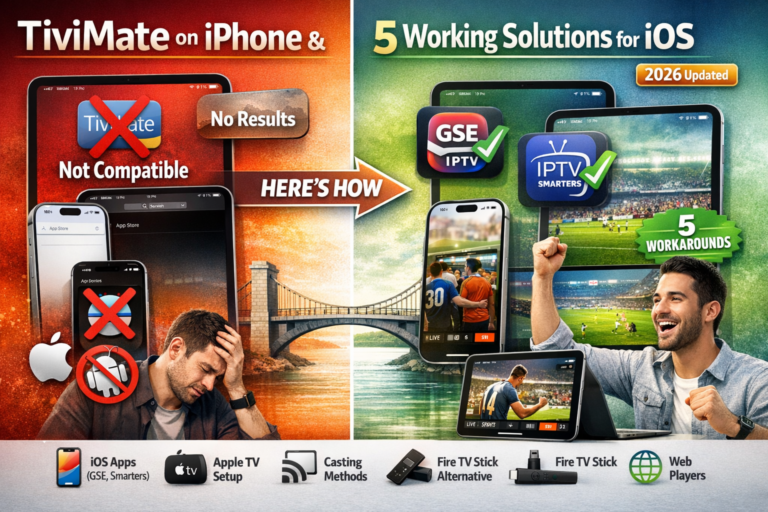
TiviMate on iPhone iPad is impossible to install directly and that frustrates thousands of Apple users who hear about TiviMate’s excellent features but can’t access them on their devices. The harsh reality is that TiviMate is an Android-exclusive app that will never appear in Apple’s App Store.
However, you’re not completely out of luck. I’ve tested every possible workaround and found five practical solutions that let iPhone and iPad users enjoy quality IPTV streaming. Some methods are better than others, but all work in 2026.
Table of Contents
Why TiviMate Doesn’t Work on iPhone or iPad
Understanding why you can’t get TiviMate on iPhone iPad directly helps you appreciate the workarounds and choose the best alternative for your situation.
iOS vs Android Platform Difference TiviMate is built exclusively for Android operating systems. iPhones and iPads run iOS/iPadOS completely different platforms with incompatible app architectures. An Android app simply cannot run on iOS without complete rebuilding from scratch.
Apple App Store Restrictions Apple maintains strict App Store guidelines that IPTV players struggle to meet. Apps facilitating access to unlicensed content face rejection. Even if TiviMate developers wanted to create an iOS version, Apple’s approval process creates significant barriers.
Development Resource Limitations TiviMate is developed by a small team focused on perfecting the Android version. Creating and maintaining a separate iOS app would require substantial investment in different programming languages, frameworks, and ongoing updates for two platforms.
Business Model Challenges Apple takes 30% of all App Store purchases and subscriptions. This drastically reduces profit margins for small developers like TiviMate. The economics don’t support iOS development when Android provides sufficient user base.
This isn’t changing anytime soon. TiviMate will remain Android-only for the foreseeable future. Accept this reality and explore the workarounds that actually work.
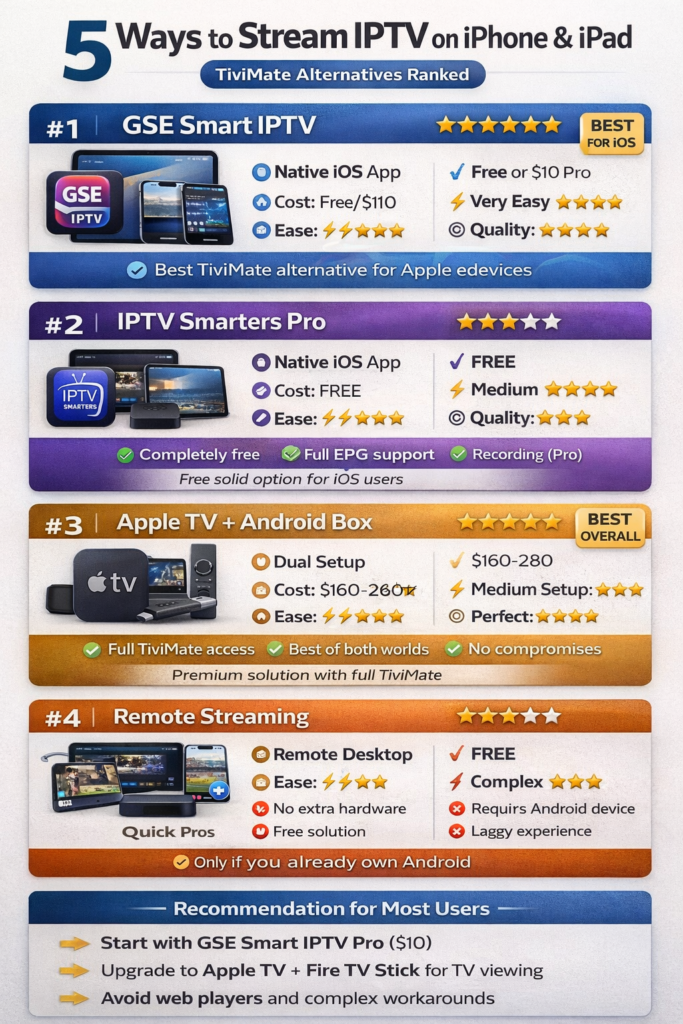
Solution 1: Use GSE Smart IPTV (Best Native iOS Option)
GSE Smart IPTV is the closest alternative to TiviMate available directly on iPhone and iPad. While not quite matching TiviMate’s polish, it delivers solid IPTV performance on iOS devices.
Why GSE Smart IPTV is the best iOS alternative:
Available in App Store Download GSE Smart IPTV directly from Apple’s App Store no jailbreaking or complicated workarounds required. Free version works well with ads, or upgrade to Pro for $10 one-time purchase.
Full M3U and Xtream Codes Support Works with standard M3U playlists and Xtream Codes API just like TiviMate. Add your IPTV service the same way you would on Android devices.
Decent EPG Integration Electronic Program Guide functionality works acceptably, though not as smoothly as TiviMate’s implementation. You get show schedules and program information for most channels.
Multi-Device Support One purchase works across iPhone, iPad, and Apple TV. Start watching on iPhone, continue on iPad, finish on Apple TV seamlessly.
Active Development Regular updates add features and fix bugs. Developer responds to user feedback and maintains compatibility with latest iOS versions.
Setup process:
- Open App Store on iPhone or iPad
- Search for “GSE Smart IPTV”
- Download and install (free or Pro)
- Open app and add your IPTV playlist
- Enter M3U URL or Xtream Codes credentials
- Browse channels and start streaming
GSE Smart IPTV won’t replace TiviMate for Android users, but it’s the best native option iPhone and iPad users have. For more player comparisons, check my IPTV player guide 2026.
Solution 2: IPTV Smarters Pro for iOS
IPTV Smarters Pro offers another solid iOS option with features comparable to TiviMate in some areas. Many IPTV providers specifically recommend this app for iPhone and iPad users.
Key features of IPTV Smarters Pro:
Provider-Friendly Interface Many IPTV services provide custom-branded versions of IPTV Smarters Pro. Your provider might offer a white-label app built on Smarters technology.
Parental Controls Lock adult content behind PIN codes. Create kid-friendly profiles with restricted channel access. Important for family use.
Catch-Up TV Support Watch missed programs from past 7 days when your IPTV provider supports catch-up functionality. Scroll back in EPG to access previous airings.
Multi-Screen Support Stream on multiple devices simultaneously depending on your IPTV subscription. Watch different channels on iPhone and iPad at the same time.
Free to Use IPTV Smarters Pro is completely free with occasional ads. No subscription or one-time purchase required for full functionality.
Installation steps:
- Visit App Store on your iOS device
- Search “IPTV Smarters Pro”
- Download and install application
- Launch app and select Add User
- Choose Xtream Codes API or M3U URL
- Enter credentials from IPTV provider
- Wait for channels to load
Compare this with TiviMate in my detailed TiviMate vs IPTV Smarters Pro comparison to understand the differences.
Solution 3: Stream TiviMate from Android to iOS
If you already own an Android device, you can stream TiviMate content to your iPhone or iPad using various casting and remote access methods. This lets you technically use TiviMate on iPhone iPad, just not natively.
Method A: AirPlay from Android to Apple TV Some Android apps support AirPlay output. Install AirPlay-compatible apps on Android, run TiviMate, and cast to Apple TV which you then control via iPhone/iPad as remote.
Method B: Remote Desktop Apps Install remote desktop software (TeamViewer, Chrome Remote Desktop) on Android device running TiviMate. Access Android device remotely from iPhone/iPad to control TiviMate streaming.
Method C: DLNA/UPnP Streaming Configure TiviMate’s built-in casting features to stream to DLNA-compatible receivers. Control playback from iPhone/iPad using compatible player apps.
Limitations of streaming methods:
- Requires Android device to stay powered on
- Increased latency compared to native playback
- Battery drain on source Android device
- Network stability critical for smooth streaming
- Complex setup not suitable for non-technical users
These workarounds work but feel clunky compared to native apps. Only pursue streaming methods if you strongly prefer TiviMate’s interface over iOS alternatives.
Solution 4: Use Apple TV with Android IPTV Box
The most elegant solution for Apple ecosystem users is combining Apple TV with a dedicated Android streaming device. This gives you best of both worlds Apple’s interface with TiviMate’s IPTV capabilities.
Setup configuration:
Hardware needed:
- Apple TV 4K or HD ($129-179)
- Fire TV Stick 4K or Android TV box ($30-100)
- TV with multiple HDMI inputs
- Your iPhone/iPad for control
How it works:
- Connect Apple TV to HDMI 1 for Apple content and interface
- Connect Fire TV Stick to HDMI 2 for TiviMate IPTV
- Install TiviMate on Fire TV Stick using Downloader
- Switch TV inputs between Apple TV and Fire TV as needed
- Control Fire TV with included remote or phone app
Benefits of dual-device setup:
- Full TiviMate functionality on big screen
- Native Apple TV experience for other streaming
- No compromises in either ecosystem
- iPhone/iPad can control both devices via apps
- Future-proof as both platforms evolve
This solution costs more upfront but delivers premium experience without forcing you to choose between platforms. Learn the full Fire TV setup process in my guide on installing TiviMate on Firestick and Android TV.
Solution 5: Web-Based IPTV Players
Some IPTV providers offer web-based players accessible through Safari on iPhone and iPad. While limited compared to dedicated apps, web players work in a pinch.
How web players work:
Your IPTV provider gives you a web portal URL. Log in through Safari browser on iPhone/iPad. Stream channels directly in browser without app installation. Limited features but functional for basic viewing.
Advantages:
- No app installation required
- Works on any device with browser
- No App Store restrictions
- Instant access from anywhere
Disadvantages:
- Poor user interface compared to apps
- Limited or no EPG functionality
- Battery drains faster than native apps
- No background playback support
- Requires constant internet connection
- Quality limitations in browser
Web players serve as emergency backup option but shouldn’t be your primary TiviMate on iPhone iPad solution. They’re useful for travel or checking something quickly.
Comparing iOS IPTV App Options
Here’s how the native iOS IPTV apps compare for iPhone and iPad users who can’t access TiviMate:
| Feature | GSE Smart IPTV | IPTV Smarters Pro | TiviMate (Android) |
|---|---|---|---|
| Platform | iOS/iPadOS | iOS/iPadOS | Android Only |
| Cost | Free/$10 Pro | Free | Free/$7/year Premium |
| EPG Quality | Good | Fair | Excellent |
| Interface | Very Good | Good | Excellent |
| Recording | Yes (Pro) | Yes | Yes (Premium) |
| Multi-Device | Yes | Yes | Yes (Premium) |
| Ease of Use | Easy | Medium | Very Easy |
| Updates | Regular | Regular | Frequent |
Recommendation: GSE Smart IPTV Pro ($10 one-time) provides the best overall experience for iPhone and iPad users. It’s not TiviMate, but it’s the closest you’ll get on iOS.
Can You Jailbreak to Install TiviMate?
Some users ask whether jailbreaking iPhone or iPad enables TiviMate installation. The answer is technically yes, but practically no it’s not worth the risks.
Why jailbreaking doesn’t help:
No iOS TiviMate Version Exists TiviMate is coded for Android. Even with jailbroken iOS, the app won’t run without complete rewrite. No jailbreak tweak makes Android apps work on iOS.
Security Vulnerabilities Jailbreaking removes Apple’s security protections, exposing devices to malware, data theft, and system instability. Risk far exceeds any potential benefit.
Warranty Voidance Apple voids warranties on jailbroken devices. If something breaks, you’re paying full price for repairs or replacement.
Update Problems iOS updates often break jailbreaks, requiring complex restore procedures. You miss important security patches staying on older iOS versions.
Banking and Payment Issues Many banking apps, payment services, and secure apps detect jailbreaks and refuse to function. You lose access to critical services.
Don’t jailbreak your iPhone or iPad hoping to run TiviMate. Use GSE Smart IPTV or IPTV Smarters Pro instead they work perfectly without compromising device security.
Best IPTV Services for iPhone and iPad
Regardless of which app you choose, you need a quality IPTV subscription that works well with iOS devices. Not all services optimize for iPhone and iPad compatibility.
What to look for in iOS-compatible IPTV:
M3U and Xtream Codes Support Ensure provider offers both formats for maximum app compatibility. GSE Smart IPTV and IPTV Smarters Pro work with both methods.
Working EPG for iOS Some providers’ EPG works on Android but fails on iOS. Verify EPG loads correctly in your chosen iOS app before subscribing long-term.
HLS Stream Format iPhone and iPad handle HLS (HTTP Live Streaming) format best. Check provider uses HLS streams for optimal iOS performance.
Multi-Device Support Look for services allowing 2+ simultaneous connections so you can watch on iPhone, iPad, and TV simultaneously.
Responsive Support Choose providers with good customer service who understand iOS app setup and can troubleshoot iOS-specific issues.
Browse my tested list of best IPTV providers that work excellently with iOS devices, or start with a free IPTV trial to test compatibility.
Troubleshooting Common iOS IPTV Issues
Even with the right app and IPTV service, iPhone and iPad users sometimes encounter streaming problems. Here are solutions to common issues.
Problem: Playlist won’t load Verify your M3U URL or Xtream Codes credentials are exactly correct with no extra spaces. Try adding playlist again from scratch. Check IPTV subscription is active and not expired.
Problem: Constant buffering Test internet speed need 25+ Mbps for HD streaming on iOS. Close background apps consuming bandwidth. Switch from WiFi to cellular data temporarily to test connection. Consider using a VPN for streaming to prevent ISP throttling.
Problem: EPG not showing Confirm your IPTV provider supplies EPG data for iOS apps. Manually update EPG in app settings. Wait 10-15 minutes after adding playlist for EPG to download completely.
Problem: App crashes frequently Update to latest app version from App Store. Restart iPhone/iPad completely. Check iOS version is compatible with app requirements. Delete and reinstall app if problems persist.
Problem: Poor video quality Adjust stream quality settings in app if available. Check IPTV provider offers HD streams, not just SD. Verify device can handle 1080p playback smoothly.
For more troubleshooting help, my TiviMate buffering guide covers fixes that apply to all IPTV apps including iOS alternatives.
Alternative: Use IPTV on Your TV Instead
Many iPhone and iPad users discover they prefer watching IPTV on their big screen TV rather than mobile devices anyway. If that’s you, focus on the TV solution and use iPhone/iPad only for casual viewing.
Best TV IPTV solutions:
Apple TV + GSE Smart IPTV Install GSE Smart IPTV on Apple TV. Control with iPhone/iPad via Apple TV Remote app. Stays within Apple ecosystem completely.
Fire TV Stick + TiviMate Plug $30 Fire TV Stick into TV. Install TiviMate for full-featured experience. Control with Fire TV remote or phone app.
Android TV Box + TiviMate More powerful than Fire TV Stick for 4K streaming. Full TiviMate functionality on big screen. Various models from $60-200.
This approach gives you the best viewing experience on TV where IPTV content looks best, while keeping your iPhone/iPad for other uses. Learn about TV compatibility in my Samsung Smart TV TiviMate guide.
Why TiviMate Probably Won’t Come to iOS
Users regularly ask whether TiviMate will eventually release an iPhone/iPad version. Based on market realities, don’t expect this to happen.
Development cost vs potential revenue: Creating iOS version requires 6-12 months development plus ongoing maintenance. Apple’s 30% App Store cut dramatically reduces profit margins. Android user base already provides sufficient revenue without iOS expansion.
Apple’s IPTV app hostility: Apple actively discourages IPTV apps facilitating access to unlicensed content. App Store rejection risk isn’t worth the investment for small developers.
Platform fragmentation concerns: Maintaining two completely different codebases doubles development burden. Updates and features would lag on one platform as resources spread thin.
Existing iOS alternatives: GSE Smart IPTV and IPTV Smarters Pro already serve iOS users adequately. Market doesn’t desperately need another iOS IPTV player the way Android did when TiviMate launched.
Accept that TiviMate will remain Android-exclusive and embrace the iOS alternatives that already exist. They’re good apps just different from TiviMate.
Final Thoughts on TiviMate for iPhone and iPad
Getting TiviMate on iPhone iPad natively is impossible and won’t change. TiviMate is an Android app through and through, with no iOS version planned or realistically coming.
Your best option is GSE Smart IPTV Pro for $10 one-time purchase. It delivers 80% of TiviMate’s functionality directly on iPhone and iPad without workarounds or compromises. For the remaining 20%, you’re not missing anything critical.
If you absolutely must have TiviMate’s exact interface, invest $30 in a Fire TV Stick for your TV and use GSE Smart IPTV on your iPhone/iPad for mobile viewing. This dual-app approach costs less than two months of cable TV and delivers the best of both worlds.
Stop waiting for TiviMate to come to iOS. Download GSE Smart IPTV today, add your IPTV subscription, and start enjoying quality streaming on your Apple devices right now.
For more IPTV setup guides and optimization tips, explore my complete IPTV player guide 2026 with everything you need to know about streaming on any device.