Internet speed for IPTV 2026 is the question every subscriber asks before cutting the cord, and the honest answer is both simpler and more nuanced than most guides make it seem. Simple because the minimum numbers are well established and lower than most people expect. Nuanced because the difference between a minimum that technically works and a connection that delivers a genuinely smooth daily experience involves several factors beyond the single download speed number that most guides focus on exclusively.
Your neighbour might run IPTV perfectly on a 20 Mbps connection while you experience buffering on a 50 Mbps plan. Understanding why requires looking at more than just download speed and examining the full picture of what your connection actually delivers to your streaming device under real household usage conditions.
This guide covers exact speed requirements for every IPTV quality tier from SD through 4K HDR, the additional factors that matter as much as raw download speed, how to test whether your connection meets the actual requirements, and what to do when your current connection falls short.
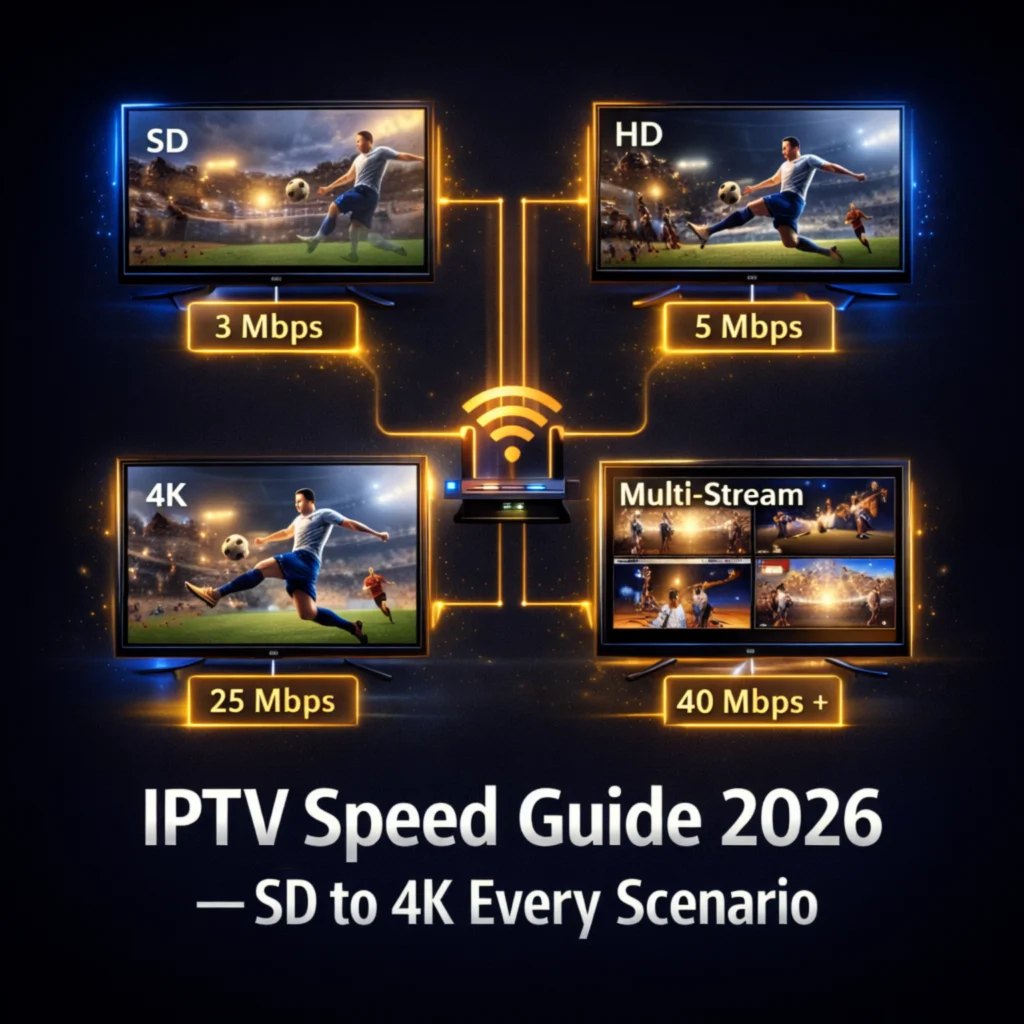
For IPTV in 2026 you need a minimum of 10 Mbps for stable HD streaming on a single device, 25 Mbps for 4K content on a single device, and 50 Mbps or above for multiple simultaneous HD streams across several household devices. Raw download speed is important but jitter, latency, and WiFi signal quality between your router and streaming device matter equally for a freeze-free daily viewing experience.
Table of Contents
The Complete IPTV Speed Requirements Table for 2026
Before diving into the nuances, having the core speed requirements for every IPTV scenario in one place gives you an immediate reference point for your specific situation.
| Stream Quality | Minimum Speed | Recommended Speed | 2 Streams | 3 Streams | 5 Streams |
|---|---|---|---|---|---|
| SD 480p | 3 Mbps | 5 Mbps | 10 Mbps | 15 Mbps | 25 Mbps |
| HD 720p | 5 Mbps | 8 Mbps | 16 Mbps | 24 Mbps | 40 Mbps |
| Full HD 1080p | 10 Mbps | 15 Mbps | 30 Mbps | 45 Mbps | 75 Mbps |
| 4K UHD | 25 Mbps | 35 Mbps | 70 Mbps | 105 Mbps | 175 Mbps |
| 4K HDR | 35 Mbps | 50 Mbps | 100 Mbps | 150 Mbps | 250 Mbps |
The minimum column represents the absolute floor below which the stream cannot play without constant buffering regardless of any other optimisation. The recommended column represents the speed at which the stream plays smoothly with a reasonable buffer margin to absorb brief fluctuations. The multi-stream columns assume each simultaneous stream runs at the same quality tier simultaneously from the same internet connection.
Why Download Speed Is Only Part of the Story
Raw download speed is the metric most people focus on when evaluating their internet connection for IPTV, but it is one of four connection quality factors that collectively determine whether your streaming experience is smooth or frustrating. The others are latency, jitter, and WiFi signal quality, and any one of them can cause IPTV freezing and buffering even when download speed tests perfectly.
Latency is the time it takes for a data request to travel from your device to the IPTV provider server and back. It is measured in milliseconds and affects how quickly each channel change responds and how fast the initial stream buffer fills when you first switch to a channel. For IPTV use, latency below 50ms delivers a responsive feel. Latency above 100ms creates a noticeable delay between pressing select on a channel and seeing the first video frame, which compounds across every channel change during an evening of browsing.
Jitter is the variability in your connection’s latency over time. A connection averaging 50ms latency with jitter of 5ms delivers a consistent 45 to 55ms response time that IPTV streams handle smoothly. A connection averaging 50ms with jitter of 40ms varies between 10ms and 90ms unpredictably, causing the brief data delivery gaps that exhaust the stream buffer and produce the intermittent freezing pattern that many subscribers experience despite adequate average download speed.
WiFi signal quality is the factor that most directly explains why two households with identical internet plans experience different IPTV results. Your 200 Mbps fibre plan delivers 200 Mbps to your router. What your Firestick or Android TV box actually receives through the WiFi signal depends on the distance from the router, the number of walls between them, interference from neighbouring networks, and the age and capability of your router hardware. A Firestick receiving 18 Mbps of effective WiFi bandwidth from a 200 Mbps fibre plan will freeze on 4K content despite the theoretically adequate plan speed.
How to Test Your Connection for IPTV in 2026
Running the right test on the right device at the right time gives you accurate information about whether your connection actually meets IPTV requirements rather than the idealised speed your internet plan advertises.
Always test on the specific device you use for IPTV rather than on your phone or laptop. Speed test results vary significantly between devices on the same network because of differences in WiFi chipset quality, antenna design, and processor speed. A speed test on your laptop that shows 150 Mbps tells you nothing useful about what your Firestick or Smart TV is actually receiving at the same moment.
Test at the time of day when you normally watch IPTV rather than at 3am when network traffic is minimal. ISP network infrastructure handles significantly higher load during peak evening hours, and your effective connection speed at 8pm on a Wednesday may be meaningfully lower than the 200 Mbps your plan advertises. Testing during your normal viewing window reveals the actual available bandwidth for IPTV rather than the best-case scenario your plan speed represents.
Install a speed test app directly on your Firestick or Android TV box. The Amazon App Store carries multiple speed test apps and the Google Play Store on Android TV carries the same options. Run the test three times in quick succession during your normal viewing hours and note all three results. If the three results vary significantly from each other, the jitter on your connection is high enough to cause IPTV buffering even when any single test appears adequate.
Note the ping value from your speed test in addition to the download speed. Ping is a proxy for latency and gives you a quick indication of whether latency is likely to cause channel switching delays. A ping below 30ms from your streaming device is excellent for IPTV. A ping between 30ms and 80ms is acceptable. A ping above 100ms consistently will cause noticeable channel switching lag that becomes frustrating during extended viewing sessions.
Before subscribing to any IPTV service, test with a free 24-hour trial during your normal viewing hours on your actual devices to confirm real-world streaming performance before committing to any paid plan.
HD vs 4K IPTV: What Your Connection Can Handle
Understanding the specific differences between HD and 4K IPTV streaming requirements helps you make realistic decisions about which quality tier your current internet connection supports and whether an internet upgrade is worthwhile for the improvement in picture quality it enables.
HD 1080p IPTV is accessible to the vast majority of home internet connections in 2026. A stable connection delivering 15 Mbps or above to your streaming device handles 1080p HD streams with a comfortable buffer margin that absorbs the brief fluctuations in data delivery rate that every internet connection experiences during normal operation. Most homes with a standard broadband connection above 20 Mbps that does not have severe WiFi signal degradation between the router and the streaming device can enjoy HD IPTV without any optimisation or settings changes.
4K UHD IPTV requires more than simply having a 4K television and a 4K-capable streaming device. The connection delivering data to that device needs to sustain 25 Mbps or above continuously rather than just averaging that speed across a test period. A connection that delivers 30 Mbps for 90% of the time and drops to 8 Mbps for 10% of the time will buffer on 4K IPTV content even though its average speed appears adequate.
4K HDR represents the highest bandwidth demand in the IPTV quality spectrum in 2026. HDR streams carry additional colour depth and dynamic range metadata alongside the 4K resolution data, pushing the per-stream bandwidth requirement to 35 Mbps minimum and 50 Mbps recommended. For households watching 4K HDR IPTV on a connection below 50 Mbps, a wired ethernet connection from router to streaming device is strongly recommended because it delivers the full available bandwidth consistently without the variability that WiFi introduces at speeds approaching the stream’s bandwidth ceiling.
Internet Speed for IPTV With Multiple Devices in 2026
Household internet speed requirements for IPTV scale with the number of simultaneous streams your household runs, and this is the calculation that most guides present incorrectly by simply multiplying single-stream requirements by the number of devices.
The accurate calculation requires knowing your household’s realistic simultaneous streaming pattern rather than the theoretical maximum. A household with five IPTV-capable devices rarely has all five streaming simultaneously at the same quality tier. Knowing your realistic peak simultaneous load, which for most households is two to three streams during evening family viewing rather than five streams every night, gives you a more practical speed requirement to work with.
For a household that realistically peaks at two simultaneous HD 1080p streams during evening viewing, a connection delivering 30 Mbps to the router with each device receiving 15 Mbps effectively covers the requirement with no margin for other network activity. Adding a 10 to 20 Mbps buffer for background internet activity from phones, computers, smart home devices, and gaming consoles on the same network brings the practical internet plan speed for this household to 50 Mbps as the comfortable minimum.
For a family household with three children who all watch different content simultaneously alongside two adults, a five-stream HD peak requires 75 Mbps minimum plus activity overhead, making a 100 Mbps or above internet plan the practical minimum for comfortable coverage. If any of those streams target 4K quality, the calculation increases proportionally.
| Household Type | Peak Streams | Quality | Minimum Plan | Recommended Plan |
|---|---|---|---|---|
| Single viewer | 1 | HD 1080p | 15 Mbps | 30 Mbps |
| Couple | 2 | HD 1080p | 30 Mbps | 50 Mbps |
| Single 4K viewer | 1 | 4K UHD | 35 Mbps | 50 Mbps |
| Family of 4 | 3 | HD 1080p | 50 Mbps | 100 Mbps |
| Large family | 5 | HD 1080p | 100 Mbps | 150 Mbps |
| Power household | 3 | 4K UHD | 150 Mbps | 200 Mbps |
What to Do When Your Internet Is Too Slow for IPTV
Several practical improvements can significantly increase the effective bandwidth your streaming device receives without requiring an internet plan upgrade, and many households that believe their connection is too slow for IPTV are actually experiencing WiFi signal degradation rather than insufficient total internet speed.
Switching from WiFi to ethernet is the most impactful single change available to most households and it costs under $15 for the adapter needed on a Firestick. An ethernet connection delivers your router’s full available bandwidth to your streaming device without any of the signal degradation, interference, or distance limitations that WiFi introduces. A household on a 30 Mbps ADSL connection with an ethernet-connected streaming device will typically experience better IPTV performance than a household on a 100 Mbps fibre connection with a streaming device five rooms away from the router over WiFi.
Router positioning and quality significantly affect the WiFi bandwidth available to devices throughout your home. A router positioned centrally on an upper floor delivers stronger signal to more rooms than one tucked in a corner cabinet on the ground floor. A modern WiFi 6 router handles multiple simultaneous device connections at higher effective speeds than a WiFi 4 or WiFi 5 router from five years ago, even on the same internet plan.
Reducing WiFi congestion by switching your streaming device to the 5GHz band rather than 2.4GHz reduces interference from neighbouring networks and other household devices that all compete for the same 2.4GHz spectrum. The 5GHz band delivers higher speeds at closer ranges and is significantly less congested in most residential environments. The trade-off is shorter range and less wall penetration, which makes it ideal for devices in the same room or adjacent room to the router but less suitable for devices far from it.
Changing your DNS server from your ISP’s default to a faster public DNS like Cloudflare 1.1.1.1 reduces the latency of stream requests without requiring any changes to your internet plan or router and takes under two minutes to implement on any device. For a complete guide to every IPTV performance optimisation available on different device types, this dedicated guide to fixing IPTV buffering issues covers every setting and network change ranked by effectiveness.
Internet Speed for IPTV on Mobile Data in 2026
Watching IPTV on mobile data rather than home WiFi is a growing use case in 2026 and the speed requirements are identical to fixed broadband, but the practical considerations around data consumption and connection stability differ significantly.
4G LTE connections in most urban areas in 2026 deliver sustained speeds above 20 Mbps during normal traffic conditions, which is sufficient for HD IPTV streaming. 5G connections where available deliver 100 Mbps or above in most deployment areas, making 4K IPTV on mobile data technically feasible in 5G coverage zones. The practical limitation for mobile IPTV is data consumption rather than speed.
HD IPTV streaming at 10 Mbps consumes approximately 4.5 GB of mobile data per hour. Watching a 90-minute football match in HD consumes approximately 6.75 GB of data. A 4K stream at 25 Mbps consumes approximately 11 GB per hour. For subscribers on mobile data plans with monthly allowances, this consumption rate limits mobile IPTV to short sessions unless the plan includes adequate data or unlimited streaming provisions.
The connection stability of mobile data varies more than fixed broadband, particularly in areas with variable signal strength or during high-traffic periods when mobile network capacity is shared among many simultaneous users. Increasing the buffer size in your IPTV app to 20 to 30 seconds when streaming on mobile data absorbs the signal strength variations that mobile networks experience during movement or in areas of variable coverage.
Frequently Asked Questions
What internet speed do I need for IPTV in 2026?
For HD 1080p IPTV on a single device you need a minimum of 10 Mbps with 15 Mbps recommended for a comfortable buffer margin. For 4K UHD streaming you need 25 Mbps minimum and 35 Mbps recommended. For 4K HDR content you need 35 Mbps minimum and 50 Mbps recommended. For multiple simultaneous household streams multiply the per-stream recommendation by your realistic peak simultaneous viewing count.
Is 10 Mbps enough for IPTV in 2026?
10 Mbps is the absolute minimum for stable HD 1080p IPTV on a single device in 2026. It works with minimal buffer margin for brief data rate fluctuations. A connection consistently delivering 10 Mbps via ethernet will stream HD IPTV adequately. The same 10 Mbps via WiFi with signal variability may produce occasional buffering. 15 Mbps is the recommended minimum for comfortable single-device HD viewing with sufficient margin to absorb normal connection variability.
Is 50 Mbps enough for IPTV in 2026?
50 Mbps is more than adequate for single-device HD or 4K IPTV in 2026. It supports two simultaneous 4K streams or up to five simultaneous HD streams with room for other household internet activity alongside the IPTV streams. For a typical household of two to four viewers watching different HD content simultaneously, 50 Mbps delivered to each device via ethernet or strong WiFi provides a completely buffer-free daily experience.
Does WiFi speed affect IPTV quality?
Yes, WiFi signal quality and effective bandwidth affects IPTV quality significantly and often more directly than the total internet plan speed. A streaming device receiving only 12 Mbps through a weak WiFi signal from a 200 Mbps router will buffer on HD content despite the fast internet plan. Improving WiFi signal quality through router repositioning, band selection, or switching to ethernet consistently produces larger IPTV quality improvements than internet plan upgrades for most households experiencing buffering.
How do I check if my internet speed is fast enough for IPTV?
Install a speed test app on your IPTV streaming device specifically rather than testing on your phone or laptop. Run three consecutive speed tests during your normal evening viewing hours and note the download speed, ping, and any jitter value shown. Compare the download speed against the requirements in this guide for your target stream quality. If the speed is adequate but IPTV still buffers, the cause is likely WiFi signal quality or jitter rather than insufficient total plan speed.
Your Internet Connection Is Ready for IPTV in 2026
The internet speed requirements for IPTV in 2026 are achievable on the vast majority of home broadband connections without any plan upgrade. Most households already have more than enough total speed and need only to improve how efficiently that speed reaches their streaming device through WiFi optimisation or an ethernet connection.
Test your connection on your actual streaming device during your normal viewing hours, implement the WiFi improvements that apply to your setup, and then test with a quality IPTV subscription during a free trial to confirm the real-world streaming experience before committing to any paid plan. The numbers in this guide tell you what your connection needs to deliver. The free trial tells you whether your specific setup actually delivers it.